Parallel Line
In This Topic
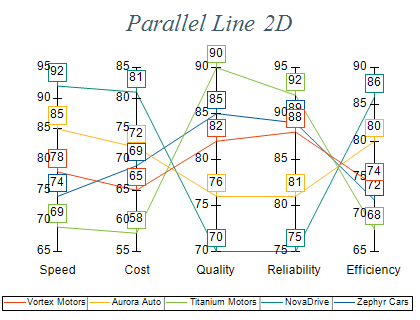
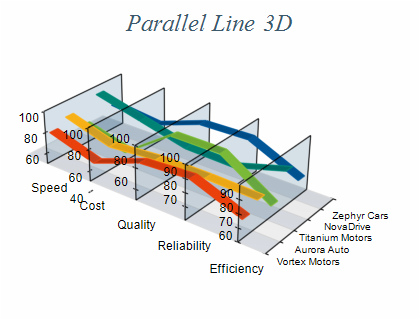
A Parallel Line Chart visualizes a sequence of data points connected by lines. Each pair of consecutive valid points is linked by a straight line segment. Unlike standard Line Charts, each data point represents a separate dimension and is scaled along its own axis. The images below illustrate a Parallel Line Chart in both 2D and 3D:
Creating a parallel line series
Parallel line series are represented by the NParallelLineSeries type. An instance of this type must be added to the series collection of a Cartesian chart.
| C# |
Copy Code
|
// obtain a reference to the Cartesian chart that is created by default
NCartesianChart chart = (NCartesianChart)chartControl.Charts[0];

// add a parallel line series to it
NParallelLineSeries line = (NParallelLineSeries)chart.Series.Add(SeriesType.ParallelLine);
|
| Visual Basic |
Copy Code
|
' obtain a reference to the Cartesian chart that is created by default
Dim chart As NCartesianChart = chartControl.Charts(0)

' add line series to it
Dim line As NParallelLineSeries = chart.Series.Add(SeriesType.ParallelLine)
|
Passing Data
Once the line series is created, you can add some data to it. Parallel line series contain only Y values. The X position of each category is determined by the position of the Y axis, which is the parallel line scale for this respective category. You assign the vertical axes that scale distinct categories to the VerticalAxes collection associated with the series. The following code shows how to create a two line series with three data points each:
| Example Title |
Copy Code
|
NChart chart = nChartControl1.Charts[0];
NCartesianAxisCollection axisCollection = (NCartesianAxisCollection)chart.Axes;
NAxis axisX = chart.Axis(StandardAxis.PrimaryX);
List<int> axisIds = new List<int>();
// add some custom axes
for (int i = 0; i < 3; i++)
{
    NCartesianAxis axis = axisCollection.AddCustomAxis(AxisOrientation.Vertical, AxisDockZone.FrontLeft);
    axis.Visible = true;
    NCrossAxisAnchor crossAnchor = new NCrossAxisAnchor();
    crossAnchor.Crossings.Add(new NValueAxisCrossing(axisX, i));
    axis.Anchor = crossAnchor;
    axisIds.Add(axis.AxisId);
}
NParallelLineSeries lineSeries1 = new NParallelLineSeries();
            lineSeries1.VerticalAxes = axisIds.ToArray();
            lineSeries1.Values.Add(10);
lineSeries1.Values.Add(20);
lineSeries1.Values.Add(30);
NParallelLineSeries lineSeries2 = new NParallelLineSeries();
lineSeries2.VerticalAxes = axisIds.ToArray();
lineSeries2.Values.Add(30);
lineSeries2.Values.Add(20);
lineSeries2.Values.Add(10);
|
The properties that control the line appearance and depth are the same as the regular NLineSeries object.
Related Examples
Windows forms: Chart Gallery\Parallel Line\Parallel Line 2D
Windows forms: Chart Gallery\Parallel Line\Parallel Line 3D
